



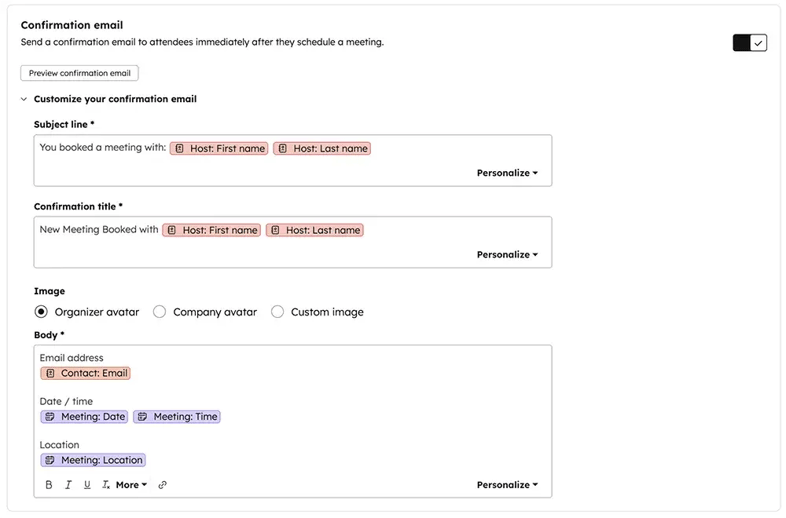
HubSpot now lets you customize the confirmation email sent to contacts when they book a meeting via your scheduling page.
This may sound small, but it’s a nice quality-of-life update if you’re scheduling many meetings in HubSpot. It should save you time.
What This Update Does
Previously, anyone booking a meeting through your scheduling page received a generic confirmation email. It confirmed the meeting was booked, but it didn’t let you customize the message itself, meaning that if any additional information was needed, you’d have to send a separate email.
With this update, you can now:
-
Customize the subject line
-
Customize the title/header
-
Edit the body copy
-
Swap in your own image/branding
-
Use tokens (e.g., meeting time, location, link)
Small details that make a big difference for user experience.
Why This Matters
Marketing teams know that meetings booked don’t equal meetings attended.
The gap between those two is often caused by uncertainty:
-
What is this call for?
-
Do I need to prepare anything?
-
Will this beon Zoom or a phone call?
-
Who am I speaking with?
A customized confirmation email helps reduce that friction by:
-
Setting expectations
-
Reinforcing value
-
Answering common questions
-
Making the meeting feel real (not transactional)
-
Improving attendance rates
It also opens the door for more specialized workflows, like:
-
Demo prep guidance
-
Required questionnaires
-
Calendars + directions for in-person meetings
-
Links to onboarding docs
-
Sales enablement collateral
-
Pre-call context for technical conversations
For service teams, it also helps clarify support expectations.
How to Customize It
To customize the confirmation email:
-
Go to Sales > Meetings Scheduler
-
Create or edit a scheduling page
-
Open the Automation tab
-
Edit your confirmation email content
-
Add tokens as needed (time, location, etc.)
-
Click Preview Confirmation Email to verify
If you're running multiple scheduling pages, each can be customized individually.
Who Gets Access
This update applies across Sales Hub and Service Hub tiers:
-
Sales Hub Starter, Professional, Enterprise
-
Service Hub Starter, Professional, Enterprise
Currently labeled Private Beta as of January 8, 2026.
Why We Like This Update
HubSpot continues to make small improvements in the scheduling and handoff experience. These are the kinds of updates that add real value without new tools or unnecessary complexity.
The ability to reinforce context, expectations and value halfway through a meeting funnel is something teams used to hack together manually. Now it’s native.
Final Takeaway
Not every HubSpot update needs to be flashy to be meaningful. This one is small and will save people quite a bit of time.