




As a proud HubSpot Solutions Partner, we’re excited to share the latest enhancements to HubSpot’s CRM Index pages. Updates that make managing, visualizing and acting on your data easier than ever. If you’ve been looking for smoother navigation, deeper insights and more flexibility in how you see your CRM, these improvements are going to feel like a game-changer.
Latest Updates as of November 4, 2025
- Expanded Calendar View
The Calendar visualization is now available across more standard and custom objects, giving you even greater control over planning, scheduling and tracking your CRM activity. - Streamlined Tabs for Faster Navigation
HubSpot refined the tab layout to be more compact and information-dense. You’ll be able to scan, switch and work across multiple views with less clutter and more clarity. - Fully Customizable Quick Filters
Create quick filters from any property, remove the defaults that aren’t relevant to you and reorder everything to match your workflow.
You can enroll in this release here.
Latest Update as of October 7, 2025
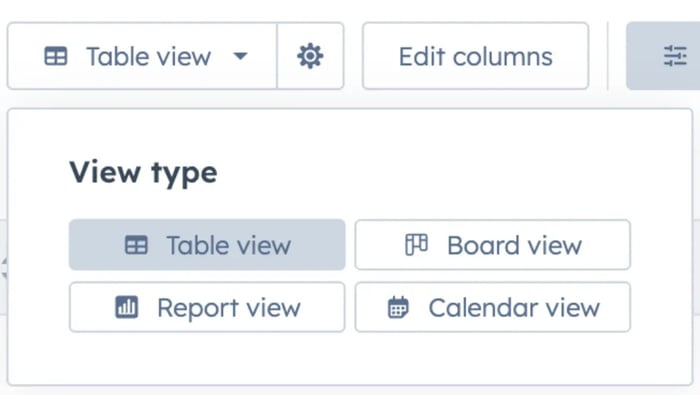
HubSpot has introduced new table display settings, a centralized place to customize exactly how your CRM tables behave. Just open the gear icon in the table toolbar to adjust:
- Data Density: Choose between Default, Compact or Comfortable row spacing.
- Visual Styling: Switch pagination styles and enable zebra striping to improve scannability.
Your choices apply instantly and persist across your user account.
What Is This Update All About?
HubSpot continues to refine the CRM Index pages to be simpler, more intuitive and more powerful, helping you move faster and focus on what truly matters. If you want a quick overview, check out HubSpot’s walkthrough here.
Why It Matters
These updates put your data front and center, right where it belongs. With new visualization options like Calendar, Gantt, Report and more, you can now interpret and navigate your CRM with greater context and flexibility.
Whether you're renaming views inline, uncovering trends with conditional highlighting or exploring deeper column-level insights, the redesigned experience is built to help you see more, click less and act with confidence.
How It Works: A Smarter, Faster CRM
Smarter Data Insights
- Column Insights: AI-powered summaries give you instant clarity at the column level.
- CRM Metrics: Customize data wells to surface the most important metrics on Company, Contact and Ticket index pages.
New Visualization Options
- Report View: Analyze CRM data directly within the index page.
- Calendar View: Visualize records across a real-time calendar.
- Gantt Chart View: Track timelines for records and associated tasks.
- Custom Board View: Group records by any field–owner, priority, stage and more.

Cleaner Design, Better Control
- Decluttered Interface: A refreshed, minimalist UI prioritizes clarity and focus.
- Visual Signals: Conditional highlighting helps you spot patterns and issues fast.
- Improved View Management: Rename, clone or delete views directly in the tab.
Who Has Access?
These redesigned CRM Index pages are rolling out across all Hubs and tiers.
Features like new view types, Data Insights and Conditional Highlighting are available for Starter+ customers.
Final Thoughts
As HubSpot continues to elevate the CRM experience, these enhancements give teams more control, better visibility and smarter insights–without adding complexity.
Curious how these new features can boost your team’s efficiency? Let’s connect! We’ll audit your current setup and take it from there!