




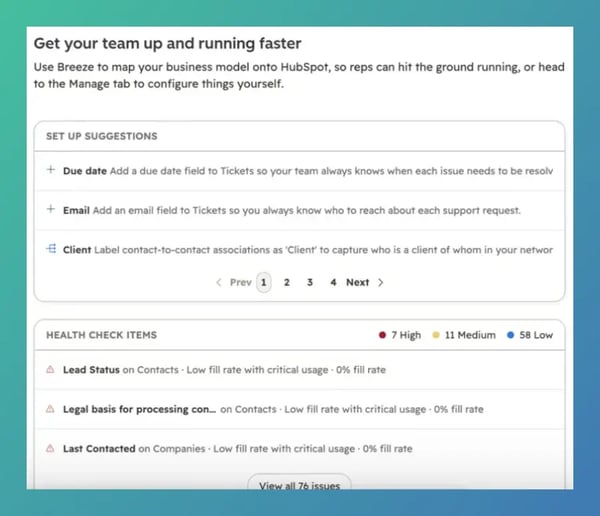
Designing and maintaining a clean CRM architecture can quickly become overwhelming, especially when structural settings, data health alerts and object configurations are scattered across different settings menus. HubSpot’s new Data Model Overview tab solves this by creating a centralized, actionable control center where you can monitor data health issues, act on AI-driven structural recommendations and manage foundational building blocks (like custom objects, properties, pipelines and association labels) in one unified view.
Key Benefits
- Reduces Implementation Anxiety: Replaces sprawling settings pages with a guided, approachable interface for admins of all experience levels.
- Proactive Hygiene Audits: Instantly flags high-urgency data health warnings before structural inconsistencies damage reporting or automation.
- Accelerate Schema Updates: Consolidates common administrative tasks into one space, minimizing the clicks required to add properties, rename objects or configure pipelines.
How It Works
- Go to Data Management > Data Model in your global navigation.
- Check top-level health checks and run prompted diagnostics to catch structural anomalies or broken configurations.
- Use built-in quick actions to launch an interactive modeling session with Breeze AI to brainstorm or refine your object architecture.
- Review tailored data model recommendations and accept high-impact improvements with a click.
- Manage saved data model drafts, set up association labels, adjust pipeline stages or rename objects directly from the overview.
Note: Access to the full overview experience and AI-driven actions requires enabling Breeze Assistant in your portal. If Breeze is turned off, users will default straight to the standard Manage tab.
Eligibility
Available across all HubSpot hubs and tiers.
The Big Picture
The real strength of this update lies in turning data architecture from a rigid administrative chore into an active, guided optimization loop. Instead of digging through multi-level menus to find out why a property is misaligned or how a custom object fits into your tech stack, admins now have an intelligent command center that flags vulnerabilities and speeds up execution.