




When an automated support chat escalates to a live representative, missing background context slows down response times and frustrates customers. HubSpot’s Customer Agent now actively gathers necessary contact and ticket details during chat conversations and writes them straight into CRM fields before handing off to a human rep.
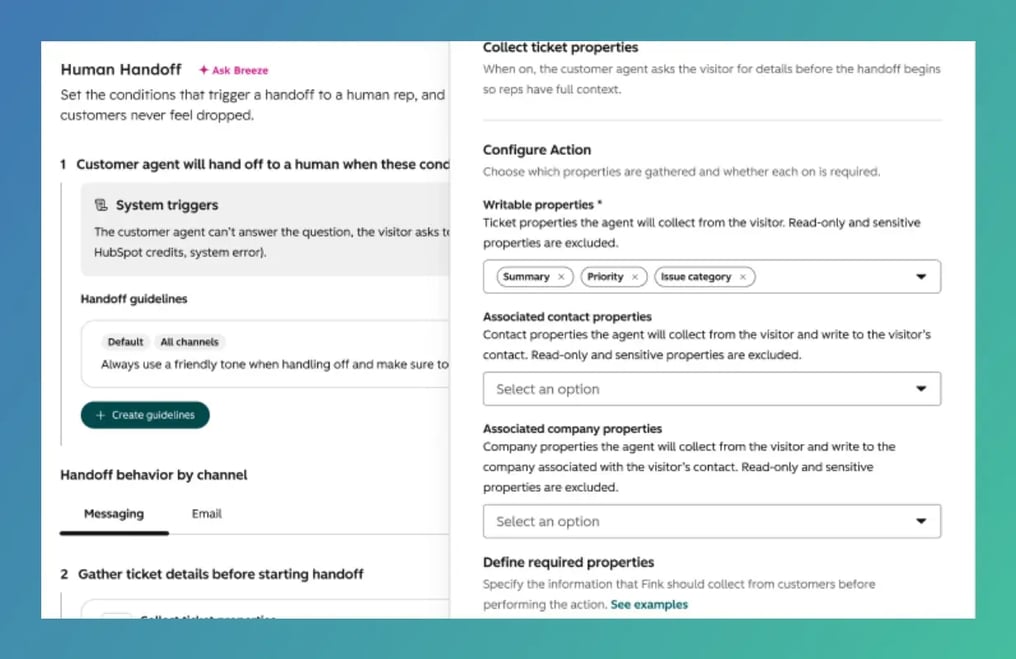
During an automated support interaction, the Customer Agent can now ask visitors targeted questions to capture vital ticket and contact properties, such as Issue Category, Urgency or Reason for Cancellation. Once retrieved, the agent updates these CRM record fields in real time and uses the populated values to send the ticket to the correct team via native workflows.
The "So What?" Factor
Passing incomplete support tickets to live reps leads to repetitive questions and misrouted conversations.
-
Smarter Escalations: Guarantees incoming support requests reach the right department (e.g., Billing, Technical Support or Retention) on the first try based on structured CRM data.
-
No More Manual Intake: Replaces clunky multi-step forms and manual triage with direct, conversational data collection.
-
Accelerated Resolutions: Live reps receive tickets with all necessary context pre-filled, allowing them to jump straight to helping the customer.
Setting the Stage
-
Navigate to Customer Agent > Human Handoff and select Collect ticket properties (or set it up directly in the Action Library).
-
Pick the specific contact and ticket properties you want the Customer Agent to gather; you can configure as many as your team needs.
-
When a visitor requests a human rep, Customer Agent prompts them for any missing property values naturally during the dialogue.
-
Gathered details write directly to the record, triggering native workflows to route the ticket to the proper team queue.
Availability
This feature is accessible across Professional and Enterprise tiers for Service, Sales, Marketing and Smart CRM.
Our Favorite Part
We love this because it turns chat handoffs into a seamless triage pipeline. Instead of handing off a raw transcript to a busy rep, Customer Agent acts as an intelligent intake assistant, structuring key details into organized CRM properties before the rep ever joins the thread.
The Bottom Line
Stop making reps do preliminary intake work. Set up property collection in Customer Agent today so every escalated ticket arrives categorized, fully detailed and routed to the right team from the start.