




You can now embed HubSpot-hosted videos on any CMS or external email platform thanks to HubSpot’s latest update. You can use a simple copy-paste embed code and track its performance in HubSpot.
That means you can:
-
Embed videos on external websites like WordPress or Shopify
-
Include videos in emails sent through other platforms
-
Track performance (views, plays, engagement) back in HubSpot
All without re-uploading or hosting your videos elsewhere.
Why This Matters
In the past, using HubSpot-hosted videos outside the platform was clunky. To embed a video on your website or an external email, you had to:
-
Upload it to a third-party platform
-
Or download and re-upload it somewhere else
This meant duplicating work every time you wanted to share a video outside HubSpot. This new update helps alleviate that and makes HubSpot a single source of truth for your video performance, even when your content lives across several platforms.
This is especially useful for teams that:
-
Use external CMS platforms like WordPress or Shopify
-
Send emails outside of HubSpot
-
Want better visibility into how video content performs
It’s a small change in functionality, but a nice step towards better content tracking in HubSpot.
How It Works (Step by Step)
Step 1: Access Your Video Library
- Navigate to Content > Video in HubSpot
-
Find the video you want to embed
-
Click the three dots and select View details
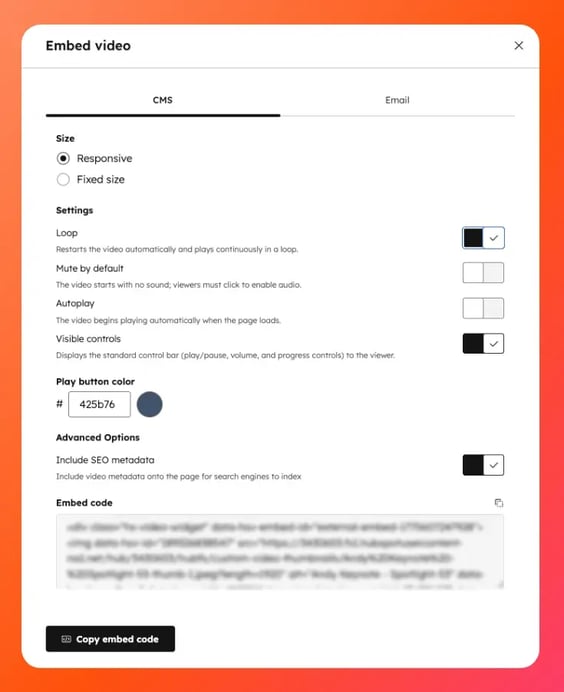
Step 2: Generate the Embed Code
-
Click the Share icon in the top right
-
Choose how you want to embed:
-
CMS tab for websites
-
Email tab for external email platforms
-
-
Click Copy code
Step 3: Embed on Your Website (CMS)
-
Paste the embed code into your CMS (WordPress, Shopify, etc.)
-
Publish your page
The embed includes:
-
A responsive video player that adjusts to screen size
-
Optional structured data (JSON-LD) for SEO benefits
- Built-in HubSpot tracking (if tracking code is installed)
Important:
To properly track analytics, your site needs the HubSpot tracking code installed.
Step 4: Embed in External Emails
-
Copy the email embed code
-
Paste it into your email platform
Since most email clients don’t support video playback directly, HubSpot automatically:
-
Inserts a thumbnail image
-
Links it to the hosted video
This keeps the experience clean while still tracking engagement.
Platform Notes (WordPress & Shopify)
For teams using common CMS platforms:
-
WordPress
- Use a Custom HTML block to paste the embed code
-
Shopify
-
Add the embed via:
-
Rich text editor (Add video)
-
HTML editor (</> option)
- Or a Custom Liquid template for more advanced use cases
-
-
Important Considerations
A few things to keep in mind:
-
Video analytics are only tracked if the HubSpot tracking code is installed on your site
-
Embedded videos still count toward your portal’s video limits
- You’ll need Advanced Video Features enabled to use embeds
Who Gets Access?
This feature is available to:
-
Content Hub Professional
-
Content Hub Enterprise
Our Take
This simple yet effective update makes it easier to host videos on HubSpot comfortably. Video is a big part of most marketing strategies, but tracking performance across platforms has always been fragmented. This brings things back into one system.