




HubSpot is pushing AI deeper into its tools, and this update is more of the same. With the new Breeze Agent CRM cards, you can view and run agent outputs directly inside your CRM record without jumping to another tool or interface.
Here’s how it works and if it actually matters.
What Is It?
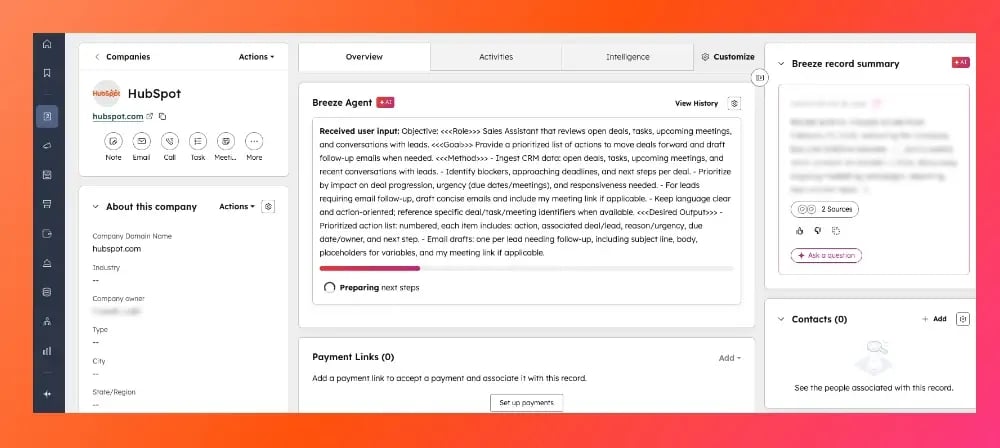
Breeze agents can now show their outputs directly within CRM records with customizable cards.
These Breeze Agent CRM cards:
-
Automatically show the most recent agent output for a record
-
Allow users to run agents directly from the record view
-
Let admins control which agents are available via the card
Instead of going somewhere else to use an agent, the output now lives where your work is already happening.
Why This Matters
The goal of this update is to prevent jumping around from tool to tool. If insights live in separate tools or tabs, they’re easy to miss and ignore. This update aims to solve that by embedding agent outputs directly into HubSpot records. This means:
-
Less context switching between tools
-
Faster access to insights tied to a specific contact, company or deal
-
A more natural connection between AI outputs and real workflows
Instead of asking, “Should I go run this agent?” the output is already there when you open the record.
How It Works (Step by Step)
For Admins: Setting Up Breeze Agent Cards
Step 1: Navigate to a CRM Record
Go to any CRM record (contact, company, deal, etc.)
Step 2: Customize the Record Layout
Click to configure the middle column of your CRM record layout
Step 3: Add the Breeze Agent Card
-
Select Create card
-
Choose “Breeze Studio Agents”
-
Select which agent you want to include
Step 4: Save the Card
Save your configuration and exit the customization view
Once added, this card will now appear on CRM records for users with access.
For Users: Viewing and Running Agents
Step 1: Open a CRM Record
Navigate to any record where the Breeze Agent card has been added
Step 2: View the Latest Output
The card will automatically display the most recent agent execution for that specific record
Step 3: Run the Agent
Use the dropdown to select and run an available agent
Step 4: See Updated Results
Once the agent runs, the card updates with the latest output
All users with access to the record can view these results, making it easy to keep insights visible across teams.
Who Gets Access?
This feature is available across all hubs and tiers, making it widely accessible to HubSpot users.
Final Thoughts
Breeze Agent CRM cards won’t completely change how you work overnight, but they do remove a pretty common friction point: having to go somewhere else to find AI insights.
By putting agent outputs directly into CRM records, HubSpot is making AI feel like part of your actual workflow, rather than something separate you have to remember to use.
If the agents continue to improve and stay useful, this could become one of the more practical ways teams interact with AI in HubSpot.