



The HubSpot Meeting Notetaker just got a significant upgrade. Designed to eliminate the distraction of manual notetaking, this tool ensures your sales team stays present with prospects while HubSpot handles the documentation.
Here is everything you need to know about the latest improvements for February 2026.
What This Update Does
HubSpot has refined the notetaker's logic and post-meeting experience in response to beta feedback. Key technical changes include:
-
Intelligent Rescheduling: The notetaker now tracks updated calendar invites and automatically joins rescheduled meetings.
-
Precision Entry: To avoid awkward "early" arrivals, the bot now joins exactly at the start time (rather than 2 minutes early) and will wait up to 5 minutes for the host to arrive.
-
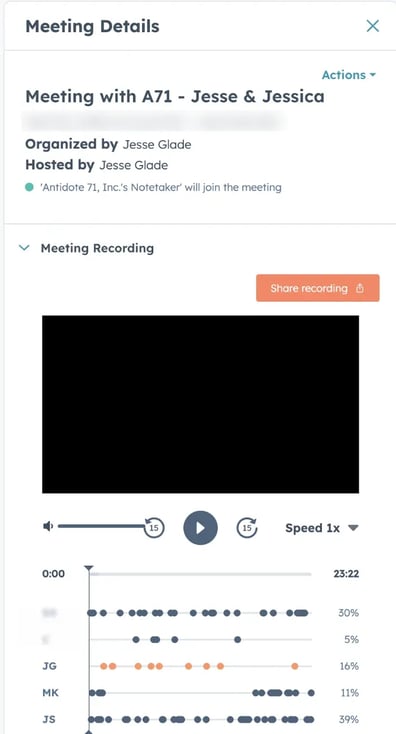
Speaker Mapping: Post-meeting transcripts now identify and label individual participants by name, making it easier to review who said what.
-
Updated Retention Policy: To optimize storage, all meeting recordings are now stored for a rolling two-year period rather than indefinitely.
Why It Matters
In sales, momentum is everything. When reps are frantically typing, they miss non-verbal cues and key pain points. This update ensures that the "paper trail" is more accurate than ever. With speaker mapping and better scheduling logic, the transition from a live conversation to a CRM-logged insight is seamless, providing managers with better coaching context and reps with clear action items.
How to Customize It
You have granular control over how the notetaker behaves within your organization:
-
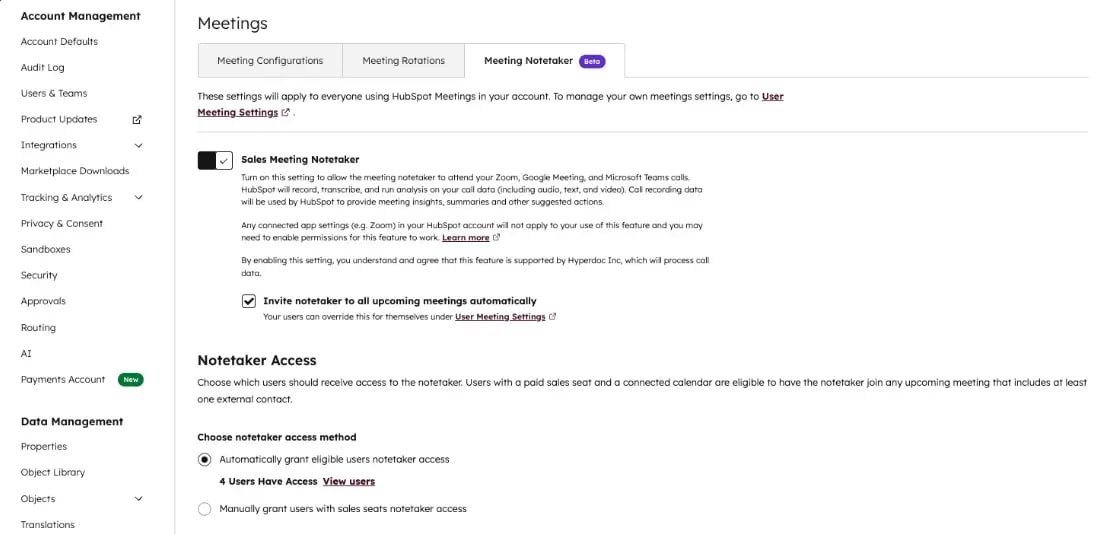
For Admins: Navigate to Settings > Tools > Calling > Meetings to toggle the feature on. You can choose to "Automatically grant access" to all eligible users or "Manually grant access" to specific team members.
-
For Individual Users: You can manage your personal preferences under Settings > General > Calendar.
-
Per-Meeting Control: If you don't want a specific meeting recorded, you can toggle the "Invite Sales Meeting Notetaker" switch off directly from the CRM activity card or the meeting record page before the call starts.
Who Gets Access
The Meeting Notetaker is available to users with:
-
Sales Hub Professional or Sales Hub Enterprise seats.
-
A connected calendar (Google or Outlook) within HubSpot.
-
Meetings hosted via Zoom, Google Meet or Microsoft Teams with at least one external contact invited.
Why We Like This Update
The standout feature here is Speaker Mapping. Reading a wall of text is one thing, but seeing a categorized dialogue makes the transcript usable for follow-ups. We also appreciate the "Precision Entry" tweak, a small change that makes the bot feel less intrusive and more like a professional assistant waiting in the wings.
Final Takeaway
The HubSpot Meeting Notetaker is moving out of its "early stages" into a polished, reliable tool. By automating the capture of Zoom, Meet and Teams calls directly into your CRM, it ensures that your data stays fresh and your sales reps stay focused on the human on the other side of the screen.