




Managing cross-functional projects inside a CRM has traditionally required creative workarounds, manual tracking or external tools. HubSpot is changing that with the introduction of a dedicated Project object and a visual Gantt chart view, bringing structured project management directly into Smart CRM. This update allows teams to plan, track and adjust projects in real time.
What This Update Does
HubSpot now includes a dedicated Project object and a Gantt chart view, allowing teams to manage structured projects directly within Smart CRM.
The new Project object lets you build and track projects as their own records, complete with properties, pipelines and automation. The Gantt chart view provides a visual timeline of projects and their associated tasks, so you can clearly see how work progresses over time.
In addition to the Gantt view, you can manage projects in the table and board views, giving teams flexibility in how they work.
Why It Matters
Cross-functional teams often struggle with project visibility, especially when timelines, tasks and dependencies are scattered across different tools.
Before this update, teams had to adapt existing CRM objects (such as Deals or Tickets) to manage projects, which often led to disconnected data and manual workarounds. That approach made it harder to maintain alignment and accurately report on project performance.
Now, with native project management built directly into the CRM:
-
Project data stays connected to contacts, companies, deals and services
-
Reporting and automation work seamlessly
-
Teams can quickly adjust timelines as priorities change
-
Everyone has real-time visibility into what’s happening and when
This brings structured project management into the same system teams already use to run their customer operations.
How to Customize It
Step 1: Activate the Project Object
-
Go to Settings > Data Management > Object Library
-
Select the Projects checkbox
-
Click Confirm
-
Configure your properties, pipelines and automation from the Project Settings page
This allows you to tailor the Project object to match your team’s specific workflows and processes.
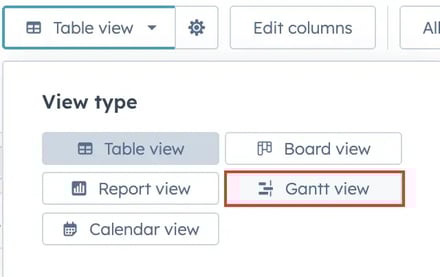
Step 2: Access the Gantt Chart View
-
Navigate to any CRM index page
-
Select an object type (available for Projects, Deals, Services and associated Tasks)
-
Click the View type button
-
Choose Gantt view
Step 3: Use the Gantt Chart
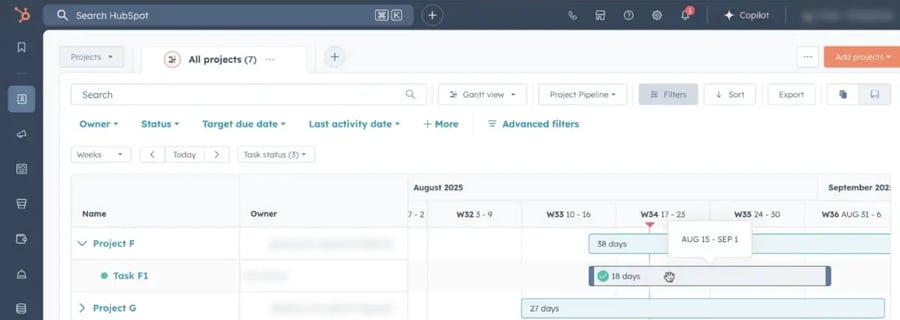
Within the Gantt view, you can:
-
Visually track record and task timelines
-
Drag timeline bars to adjust dates
-
Add or complete tasks directly from the chart
-
Filter and zoom to focus on specific records or timeframes
All changes automatically sync with CRM properties, ensuring your data stays accurate and up to date.
Who Gets Access
The Gantt chart view is available to accounts on Starter, Professional and Enterprise.
Why We Like This Update
This update eliminates the need for a workaround in HubSpot project management. Instead of bending Deals or Tickets to function like projects, teams now have a purpose-built object designed for structured work.
It also keeps everything connected:
-
Projects tied directly to revenue and service delivery
-
Tasks tied directly to timelines
-
Reporting tied directly to real CRM data
Most importantly, the visual Gantt chart makes it easier for teams to understand timelines at a glance, which is often missing from traditional CRM views.
Final Takeaway
HubSpot’s new Project object and Gantt chart view bring true project management into the Smart CRM.
If your team manages cross-functional initiatives, onboarding projects, service delivery timelines or revenue-impacting work, this update gives you the visibility, structure and flexibility to manage it all in one connected system.
No more workarounds. No more disconnected timelines. Just streamlined project management inside the CRM you already use.